
.Net Assembly - Advanced Search
.NET Assembly provide quick postcode address lookup software functionality for .NET Programming Languages with Full Address search.
The “Advanced Search" word search facility is available when using our Web Based data. The code and operation is identical to Full Address search Steps 1-5.
How to use Advanced Search
On the Full Address search window, simply click on the Advanced Search button
Advanced Search Example
This function adds an Advanced Find button to the
search window provided by SearchForFullAddressWithDialogue call (See previous section). This allows users to enter
address words to search for, to return Full address
information:
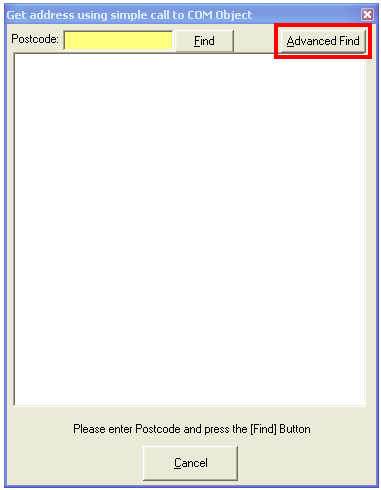
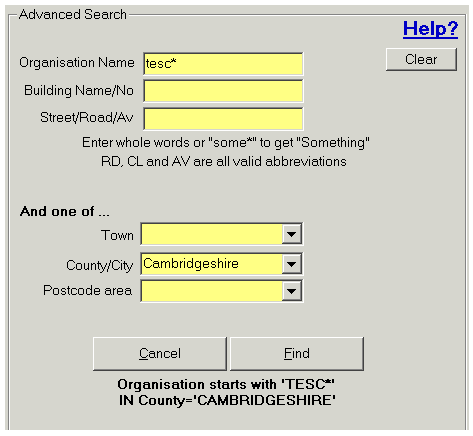
When the Advanced Find button is pressed the following is displayed:
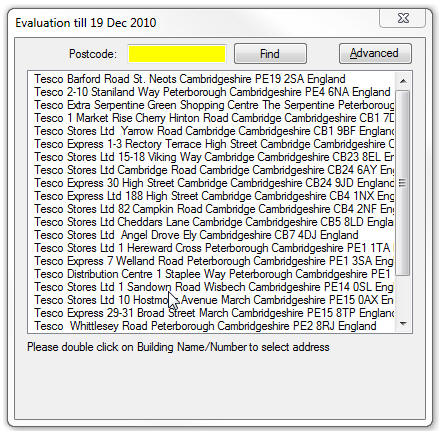
Results
 This call can ONLY be used with Internet
based data
This call can ONLY be used with Internet
based data
Step 6 Testing
Final step is to test, to enable easy testing please use our special test postcodes.
Postcode Software Full Address - Example Code
Simply download the example code. The code is in the "NET assembly/Csharp NET Assembly Example" or "NET assembly/VB NET Assembly Example" directory of our example downloads.
These two examples demonstrate postcode lookup software using Full Address.
Full Address using the .NET Assembly + your own User Interface
This is a two-step process. First we present a list to the user, then wait for user selection. After selection we retrieve the full address from the database.
Follow steps 1-4 above.
Step 5 Sign up for trial
Simply use the "Sign Up for Trial" link at top right of this page to open a trial account. We will then send you a data key, which is used to identify your account, when using the following service.
Step 6 Present a list fo addreses from postcode entered
Simply call GetFullAddressToList(Postcode), with the Postcode the user has entered in search box.
 This call can be used with Local Data or Internet based data.
Parameters
| Parameter name | Description |
|---|---|
| Postcode as string | Postcode to find. If using our Internet based data, then the user can enter words, and wildcard, to search for address data. |
Returns
Returns true if address search completed and General_credits_display_text contains summary of Credits/License status. Else errors reported in General_errormessage.
Step 7 Call for each line to display
And then call GetFullAddressLineForSelection() to get each line for list selection for display, discussed in next section.
Example Full Address search code
                    VB.NET

                      'Set Data key, to identify your account

                      SimplyPostCodeLookup.SetDataKey(Me.txtDataKey.Text)
                       Me.ListBox1.Items.Clear()
                       With SimplyPostCodeLookup
                         If .GetFullAddressToList(Me.txtPostcode.Text) Then


                           'Make list + Cancel button visible

                           Me.ListBox1.Visible = True

                           Me.ButCancelSelection.Visible = True
                          'Now Populate the List box

                           Dim Line$

                           Line = .GetFullAddressLineForSelection()

                           Do Until Line = ""

                             Me.ListBox1.Items.Add(Line)

                             Line = .GetFullAddressLineForSelection()

                         Loop
                         Else

                            MsgBox(.General_credits_display_text & vbCrLf & .General_errormessage,

                                                 vbCritical, "Simply Postcode Lookup")

                        End If
                         Me.Text = "Simply Postcode Lookup : " & .General_credits_display_text
                      end With
                    C# .NET

                      string DataKey;

                      DataKey = "Your Data Key"

                      SimplyPostCodeLookup.SetDataKey(ref DataKey);
                       ListBox1.Items.Clear();
                       string PostCodeToFind = txtPostcode.Text;

                        if (SimplyPostCodeLookup.GetFullAddressToList(ref PostCodeToFind) == true)

                        {

                          //Make list + Cancel button visible

                          ListBox1.Visible = true;

                          ButCancelSelection.Visible = true;
                          //Now Populate the List box

                            string Line="";

                          Line = SimplyPostCodeLookup.GetFullAddressLineForSelection();

                          while (Line != "")

                          {

                              ListBox1.Items.Add(Line);

                              Line = SimplyPostCodeLookup.GetFullAddressLineForSelection();

                          }
                        } else {

                           MessageBox.Show(SimplyPostCodeLookup.General_credits_display_text + " " +

                          SimplyPostCodeLookup.General_errormessage, "Simply Postcode Lookup");

                        }
                       this.Text = "Simply Postcode Lookup : " +

                        SimplyPostCodeLookup.General_credits_display_text;
Step 8 Get Address Reord Selected
Now get Address record, when user double clicks on address line in selection box
Calling GetFullAddressRecord(SelectedListIndex as long)
Parameters
| Parameter name | Description |
|---|---|
| SelectedListIndex as long | The index number of the item selected in the listbox. Zero being the first item on the list |
Returns
Returns true if address search completed and General_credits_display_text contains summary of Credits/License status. Else errors reported in General_errormessage.
Example get address record
                    VB.NET

                      With SimplyPostCodeLookup

                         If .GetFullAddressRecord(Me.ListBox1.SelectedIndex) Then
                                                Me.CompanyName.text = .Address_Organisation

                            Me.Line1.text = .Address_Line1

                            Me.Line2.text = .Address_Line2

                            Me.Line3.text = .Address_Line3

                            Me.Town.text = .Address_Town

                            Me.County.text = .Address_County

                            Me.Postcode.text = .Address_Postcode
                                              Else

                                                  MsgBox(.General_credits_display_text & vbCrLf & .General_errormessage,

                                        vbCritical, "Simply Postcode Lookup")

                         End If
                                               Me.Text = "Simply Postcode Lookup : " & .General_credits_display_text

                                        End With
                    C# .NET

                      int  SelectedIndex=ListBox1.SelectedIndex;

                      if (SimplyPostCodeLookup.GetFullAddressRecord(ref  SelectedIndex)==true)

                      {

                        CompanyName.text = SimplyPostCodeLookup.Address_Organisation;

                         Line1.text = SimplyPostCodeLookup.Address_Line1;

                         Line2.text = SimplyPostCodeLookup.Address_Line2;

                         Line3.text = SimplyPostCodeLookup.Address_Line3;

                         Town.text = SimplyPostCodeLookup.Address_Town;

                         County.text = SimplyPostCodeLookup.Address_County;

                         Postcode.text = SimplyPostCodeLookup.Address_Postcode;
                      } else {

                           MessageBox.Show(SimplyPostCodeLookup.General_credits_display_text +  " " +

                                    SimplyPostCodeLookup.General_errormessage,  "Simply Postcode Lookup");

                      }


                      this.Text = "Simply Postcode Lookup : " +

                                                   SimplyPostCodeLookup.General_credits_display_text;
Step 9 Testing
Final step is to test, to enable easy testing please use our special test postcodes.
Postcode Software - Example Code
Simply download the example code. The code is in the "NET assembly/Csharp NET Assembly Example" or "NET assembly/VB NET Assembly Example" directory of our example downloads.
These two examples demonstrate postcode lookup software using Full Address.
Alternative using Address ID
In the previous two steps we used the NET assembly to remember, in the background, the actual address record IDs used to get the resultant address record. This makes implementing for traditional desktop software easier.
When implementing for a web site we need to store the actual address ID’s in the combo box we allow the user to select from since we cannot keep the state of the NET Assembly alive between calls from the users web page. Indeed the SimplyPostCodeLookup object life is only the duration of the address query.
Follow steps 1-4 above.
Step 5 Present a list fo addreses from postcode entered
To obtain the Address ID and the line information, we use:
.GetFullAddressLineForSelectionWithID(ID as string)
Instead of .GetFullAddressLineForSelection()
Example code to get list
    VB.NET

      Dim SimplyPostCodeLookup = New ISimplyPostCodeClass.ISimplyPostCodeClass(CurDir)
      'Set Data key, to identify your account

       SimplyPostCodeLookup.SetDataKey("Your Data key")
      'If using Local Mode data files then the following code sets the PATH.

       'SimplyPostCodeLookup.LMSetDataPath(DataPATH)
      Dim PostCode$ = "PE13 2QL";

       Me.ListAddresses.Items.Clear()
      With SimplyPostCodeLookup
        If .GetFullAddressToList(PostCode$) Then
          'Now Populate the List box

          Dim Line$ = "", ID$ = ""

          Line = .GetFullAddressLineForSelectionWithID(ID)
          Do Until Line = ""
            Me.ListAddresses.Items.Add(New ListItem(Line, ID))

             Line = .GetFullAddressLineForSelectionWithID(ID)

           Loop

         Else

           'Display errror

           Me.Label2.Text = .General_credits_display_text & vbCrLf & .General_errormessage

       End If
        If Me.ListAddresses.Items.Count = 0 Then Me.Label1.Text = "Nothing found..."
        Me.Label2.Text = "Simply Postcode Lookup : " & .General_credits_display_text

     End With
      SimplyPostCodeLookup = Nothing
Step 6 Get Address Reord Selected
Then we need to get the Address record, when user double clicks on address line in selection box.
This time we call GetFullAddressRecordByAddressID(addressID as string)
Parameters
| Parameter name | Description |
|---|---|
| addressID as string | The Address ID is returned in this string |
Returns
Returns true if address search completed and General_credits_display_text contains summary of Credits/License status. Else errors reported in General_errormessage.
Example code to get address
                    VB.NET

                      Dim addressID$ = "11570840_0E"
                      Dim SimplyPostCodeLookup = New ISimplyPostCodeClass.ISimplyPostCodeClass(CurDir)


                       'Set Data key, to identify your account

                     SimplyPostCodeLookup.SetDataKey("Your datakey")
                      'If using Local Mode data files then the following code sets the PATH

                       'SimplyPostCodeLookup.LMSetDataPath(DataPATH)
                      Dim DataToDisplay$ = ""
                      With SimplyPostCodeLookup

                         If .GetFullAddressRecordByAddressID(addressID$) Then

                             DataToDisplay = "Organistaion:" & .Address_Organisation & "
"

                             DataToDisplay += "Line1:" & .Address_Line1 & "
"

                             DataToDisplay += "Line2:" & .Address_Line2 & "
"

                             DataToDisplay += "Line3:" & .Address_Line3 & "
"

                             DataToDisplay += "Town:" & .Address_Town & "
"

                             DataToDisplay += "County:" & .Address_County & "
"

                             DataToDisplay += "Postcode:" & .Address_Postcode & "
"

                          Else

                             'Display error

                             MsgBox(.General_credits_display_text & vbCrLf & .General_errormessage,

                                            vbCritical, "Simply Postcode Lookup")

                          End If
                         DataToDisplay += "Simply Postcode Lookup : " & .General_credits_display_text

                       End With


                      SimplyPostCodeLookup = Nothing
Step 7 Testing your Address Search Software
Final step is to test, to enable easy testing please use our special test postcodes.
Postcode Software Advanced Search - Example Code
Simply download the example code. The code is in the "NET assembly/Csharp NET Assembly Example" or "NET assembly/VB NET Assembly Example" directory of our example downloads.
These two examples demonstrate postcode lookup software using Full Address.
Data Returned
This type of license returns: (see example below)
Public Address_Id As String ●
Public Address_Organisation As String
Public Address_Line1 As String
Public Address_Line2 As String
Public Address_Line3 As String
Public Address_Town As String
Public Address_County As String
Public Address_Postcode As String
Public Address_Country As String
'Note: When using getting Thoroughfare only:
'Address_Organisation is Not returned
'Address_Line1 may return road name, but the user must supply the Building
'Name/Number in your software, so you will need to prompt them for this data
'Extra Address information contained in PAF data file
Public Address_Deliverypointsuffix As String ●
Public Address_NoHouseHolds As String ●
Public Address_Smallorg As String ●
Public Address_PoBox As String ●
Public Address_Rawpostcode As String ●
Public Address_Mailsort As String ●
Public Address_Unique As String ● *
Public Address_UDPRN As String ● *
Public Address_Spare As String ● *
* = Not available in Local Mode
● see Additional Data Returned by Postcode Finder API for more information