
Get Full Address using Advanced/Word Search
This postcode web service will suit almost any web language - Web HTTP to request XML data. Providing Postcode Software Lookup within your software/Web site with Advanced/Word search.
The HTTP/XML Web Service also supports our advanced/word search when used for Internal Use. This allows the user to enter partial address words to find the full address in the Royal Mail Postcode Address file.
The principle, of searching, is very similar to the Full Address Postcode Finder described in section above. Except it has more parameters.
Step 1 Sign up for trial
Simply use the "Sign Up for Trial" link at top right of this page to open a trial account. We will then send you a data key, which is used to identify your account, when using the following service.
Step 2 Search for matching data and display
To perform an advanced search, two of the following fields should be filled in with criteria
One or more of the following:
| Parameter name | Description |
|---|---|
| organistaion | Enter most distinctive word of Organisation name. Start of words can be entered by using * For example “StartOfWord*” |
| buildingornumber | Enter most distinctive word of Building Name or number. Start of words can be entered by using * For example “StartOfWord*” |
| street | Enter most distinctive word of Street/Road or Avenue Name. Start of words can be entered by using * For example “StartOfWord*” |
And one of the following from a selection list:
| Parameter name | Description |
|---|---|
| townorvillage | Town or village name selected from a list |
| county | County name selected from a list |
| postarea | Start of Postcode (Outer Postcode) selected from a list |
The XML list of TownOrVillage, County, and Postcode Outer can be downloaded from URL:
 https://www.simplylookupadmin.co.uk/XMLService/GetLookups.aspx?datatype=1
This list should be written to a local store, and displayed for user to select from.
 Tutorial Video: archive unavailable
Returns
If
If
 Note: Only the first 100 lines of advanced search results are returned. In which case the criteria should be refined.
This type of search is only available to “Internal use” type of license
Example
    Web Service

      www.simplylookupadmin.co.uk/XMLservice/XMLSearchForAddress.aspx?datakey=Your Data Key &organistaion=Tesco&buildingornumber=&street=&townorvillage=&county=Cambridgeshire&pobox=&postarea=
Returns XML 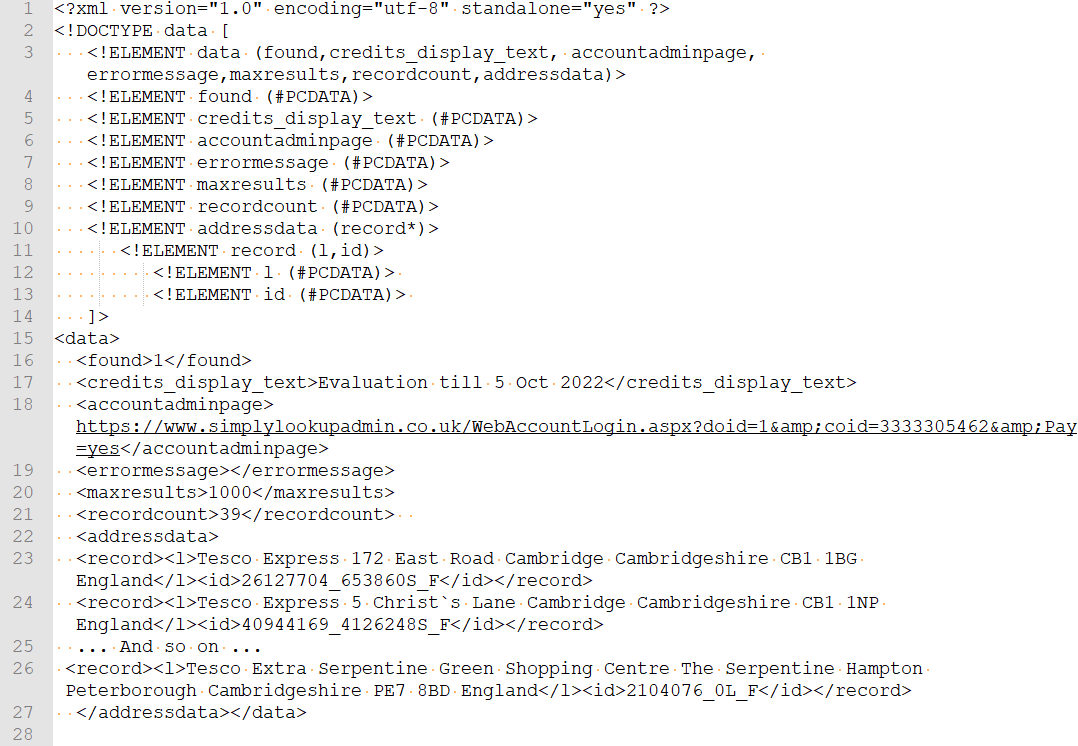
It is a requirement of the royal mail that if postcode lookup software is used by an employee of a company, then the user must be uniquely identified so we can apply a user count.
Therefore the URL must contain a User ID:
www.simplylookupadmin.co.uk/XMLservice/XMLSearchForAddress.aspx?datakey=Your Data Key &organistaion=Tesco&buildingornumber=&street=&townorvillage=&county=Cambridgeshire&pobox=&postarea= &username=UserID
This will be the datakey beginning with "I"
Section 3.5 of the Terms and Conditions state: "The Customer, when using the Postcode Lookup service via Web Service, must make sure each user is identified by a unique Computer name, in each call to the Web Service if used internally”. In simple language this means that each user must be identified by a unique computer name, in username parameter, if used by a company employee.
Step 3 Get Address record based on record select
When the users selects a record then simply get it using the sames call as in step 3 of the "Full Address" search.