
Redefining the Hot Key (Windows + S Key)
The postcode software can have the hot key redefined from the standard hot key 'Windows + S'.
The hot key “Windows + S” key can be redefined from the “Defs” window.
To access the definition settings window select "Options >> Access settings" menu, from the main search window.
The system will then ask for your password you assigned when you opened your account. If the system is using Local data, then the password is "LocalMode"
From within this window select “Options >> Change hot key”
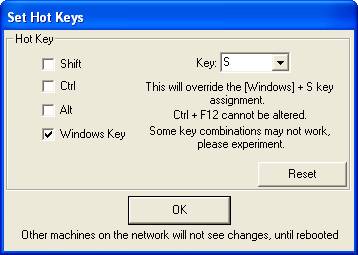
Some key combinations are not possible; please try your own combination.
Ctrl + F12, cannot be redefined, so use this keystroke to activate if new definition fails.
This changes the key combinations for other computers sharing this software on a network, next time the computer reboots.